See what your repo
tells your AI agents.

Agent instructions are scattered everywhere — AGENTS.md, CLAUDE.md, Cursor rules, Copilot instructions, and a dozen more conventions. One command finds them all and shows you exactly what your coding agents are being told, and what it costs in tokens.

$ npx agentoscope
agentoscope.rafael.ltd/r/
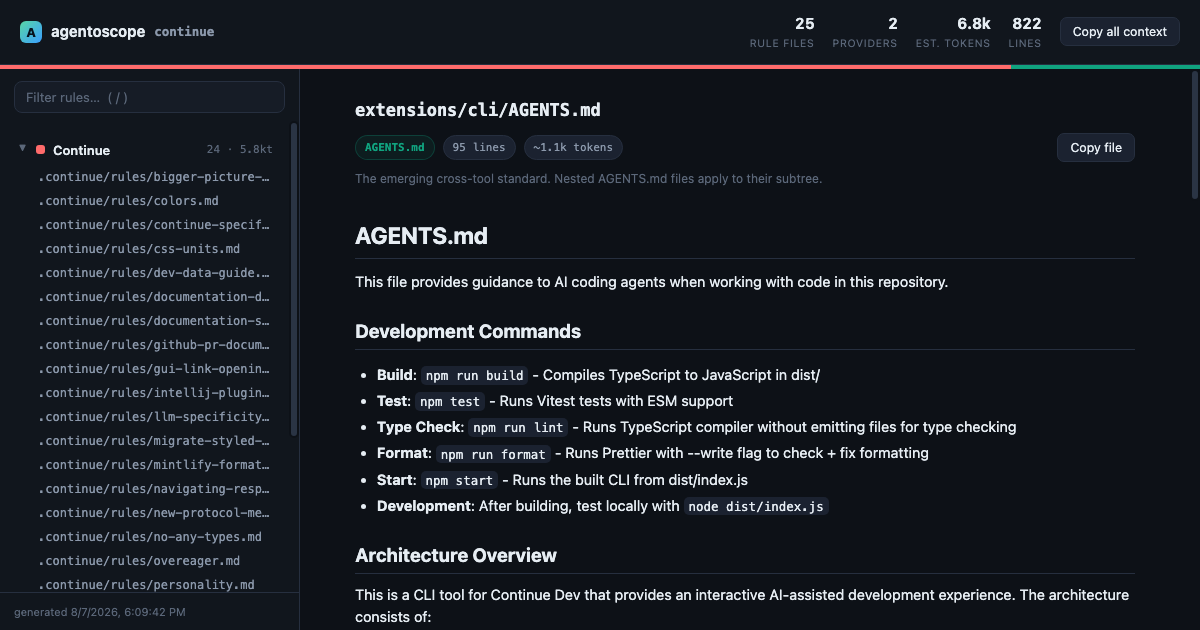
agentoscope dashboard showing agent instruction files grouped by provider
agentoscope scanning continuedev/continue — 25 rule files, 2 providers, ~6.8k tokens of agent context

One command. Every convention.

agentoscope knows where each AI coding tool keeps its instructions — including nested files that only apply to part of your tree.

Why teams run it

Agent rules are invisible context. Make them visible, measurable, and reviewable.

📊

Token budgets

Every rule file rides along in some agent's context window. See the estimated token cost per file and per provider at a glance.

🧬

Drift detection

Spots symlinks (CLAUDE.md → AGENTS.md) and copy-pasted duplicates, so rules that drift apart get caught before they contradict each other.

🎯

Rule targeting

Parses .mdc and .instructions.md frontmatter — globs, applyTo, alwaysApply — and shows exactly which files each rule attaches to.

📦

Shareable reports

Export a single self-contained HTML file. Attach it to a PR, a wiki page, or a design doc — no server, no dependencies, works offline.

📋

One-click context

"Copy all context" concatenates every rule file into one blob — perfect for pasting into a chat model that can't read your repo.

🔒

Local-first

Zero runtime dependencies, binds to 127.0.0.1 only. Your code never leaves your machine.

Usage

No install needed — npx runs it straight from the registry. Requires Node 18+.

# scan the current repo, open the dashboard
$ npx agentoscope

# scan another directory
$ npx agentoscope ../other-repo

# export a shareable, self-contained report
$ npx agentoscope -o report.html

# machine-readable output for scripts and CI
$ npx agentoscope --json | jq .stats
-o, --output <file>Write a self-contained HTML report and exit
--jsonPrint the scan report as JSON (files, providers, stats, frontmatter)
--no-openStart the local server without opening a browser
-p, --port <n>Pin the server port (default: random)
/  ·  EscIn the viewer: focus the filter box / clear it

Proud of your agent setup? Add the badge next to your AGENTS.md:

[![agent rules](https://agentoscope.rafael.ltd/badge.svg)](https://agentoscope.rafael.ltd)